> ## Documentation Index
> Fetch the complete documentation index at: https://docs-staging-fix-docs-5547-passwordless-db-update.mintlify.site/llms.txt
> Use this file to discover all available pages before exploring further.

> Learn how to configure a progressive profile form using Forms for Actions

# Use Cases: Configure a progressive profile form using Forms

<Card title="Before you start">
  1. Create a [Machine-to-Machine Application](/docs/get-started/auth0-overview/create-applications/machine-to-machine-apps) with the following scopes enabled:

  * `read:users`
  * `update:users`
  * `create:users`
  * `read:users_app_metadata`
  * `update:users_app_metadata`
  * `create:users_app_metadata`

  2. Add a [Vault connection](/docs/customize/forms/vault) using the M2M application credentials.
</Card>

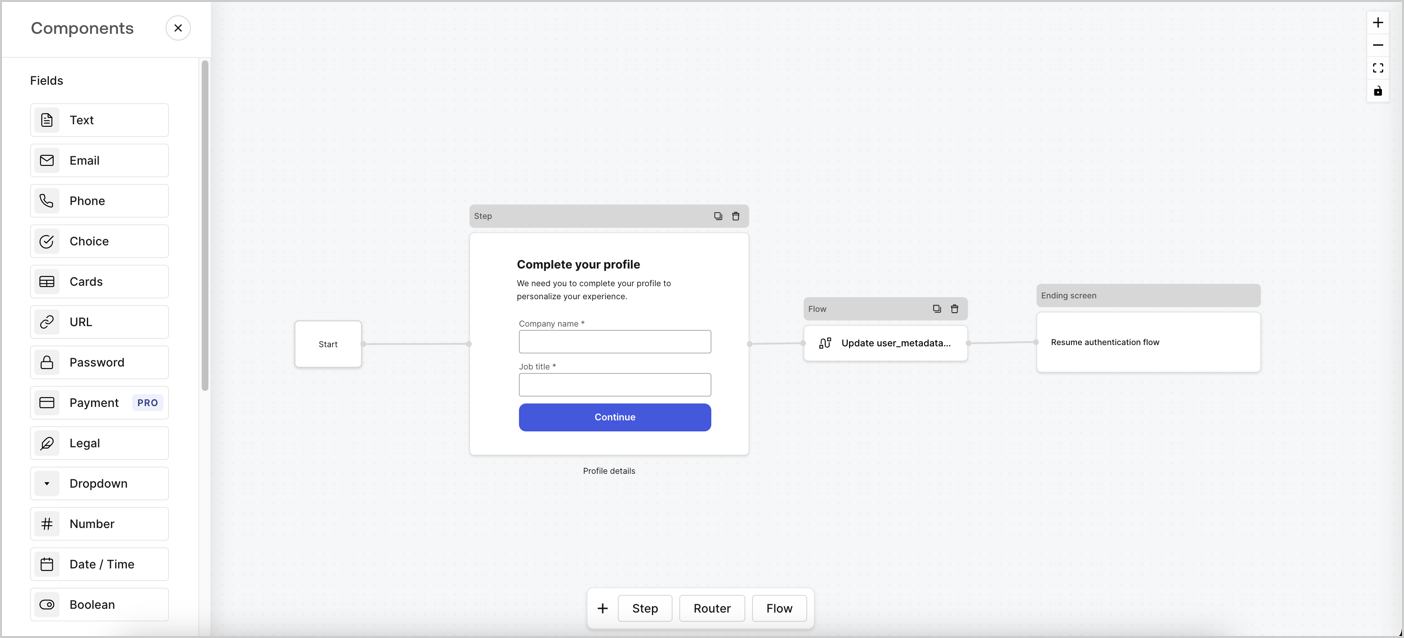
Forms for Actions allows you to create progressive profiling flows to decide when to prompt users to collect missing information, such as company name and job title, and store them as `user_metadata` attributes.
<Frame>
  <img src="https://mintcdn.com/docs-staging-fix-docs-5547-passwordless-db-update/07CzZhBp-DbHGKRO/docs/images/cdy7uua7fh8z/xUx9YmnHvnAqL19JvNtNP/60dae88f893d4ebe8e3523421e960596/Progressive-profle-overview.png?fit=max&auto=format&n=07CzZhBp-DbHGKRO&q=85&s=2c0b87331814f48d0532bdf91b6a8277" alt="Dashboard > Actions > Forms > Form" data-og-width="1404" width="1404" data-og-height="638" height="638" data-path="docs/images/cdy7uua7fh8z/xUx9YmnHvnAqL19JvNtNP/60dae88f893d4ebe8e3523421e960596/Progressive-profle-overview.png" data-optimize="true" data-opv="3" srcset="https://mintcdn.com/docs-staging-fix-docs-5547-passwordless-db-update/07CzZhBp-DbHGKRO/docs/images/cdy7uua7fh8z/xUx9YmnHvnAqL19JvNtNP/60dae88f893d4ebe8e3523421e960596/Progressive-profle-overview.png?w=280&fit=max&auto=format&n=07CzZhBp-DbHGKRO&q=85&s=918b64ced1ec7b88d66679dfbe7350b1 280w, https://mintcdn.com/docs-staging-fix-docs-5547-passwordless-db-update/07CzZhBp-DbHGKRO/docs/images/cdy7uua7fh8z/xUx9YmnHvnAqL19JvNtNP/60dae88f893d4ebe8e3523421e960596/Progressive-profle-overview.png?w=560&fit=max&auto=format&n=07CzZhBp-DbHGKRO&q=85&s=f3da20d4b2a9612320d416927577142f 560w, https://mintcdn.com/docs-staging-fix-docs-5547-passwordless-db-update/07CzZhBp-DbHGKRO/docs/images/cdy7uua7fh8z/xUx9YmnHvnAqL19JvNtNP/60dae88f893d4ebe8e3523421e960596/Progressive-profle-overview.png?w=840&fit=max&auto=format&n=07CzZhBp-DbHGKRO&q=85&s=a087a337e8d78a297558a5b8d5f26435 840w, https://mintcdn.com/docs-staging-fix-docs-5547-passwordless-db-update/07CzZhBp-DbHGKRO/docs/images/cdy7uua7fh8z/xUx9YmnHvnAqL19JvNtNP/60dae88f893d4ebe8e3523421e960596/Progressive-profle-overview.png?w=1100&fit=max&auto=format&n=07CzZhBp-DbHGKRO&q=85&s=68a84ddb3e86a0d3e313c1a7511eb0b3 1100w, https://mintcdn.com/docs-staging-fix-docs-5547-passwordless-db-update/07CzZhBp-DbHGKRO/docs/images/cdy7uua7fh8z/xUx9YmnHvnAqL19JvNtNP/60dae88f893d4ebe8e3523421e960596/Progressive-profle-overview.png?w=1650&fit=max&auto=format&n=07CzZhBp-DbHGKRO&q=85&s=4b60909784ebff208418ae4197d9e836 1650w, https://mintcdn.com/docs-staging-fix-docs-5547-passwordless-db-update/07CzZhBp-DbHGKRO/docs/images/cdy7uua7fh8z/xUx9YmnHvnAqL19JvNtNP/60dae88f893d4ebe8e3523421e960596/Progressive-profle-overview.png?w=2500&fit=max&auto=format&n=07CzZhBp-DbHGKRO&q=85&s=d0b078cd055980005bd7b6a777595125 2500w" />
</Frame>

The sections below outline how you can create a progressive profile form using nodes and flows, along with steps for adding your form to a [Post Login Action](/docs/customize/actions/explore-triggers/signup-and-login-triggers/login-trigger).

## Create a form from scratch

Follow these steps to create a form to gather information:

1. Open the Form editor by selecting **Auth0 Dashboard > Actions > Forms.**
2. Select **Create Form** > **Start from scratch**.

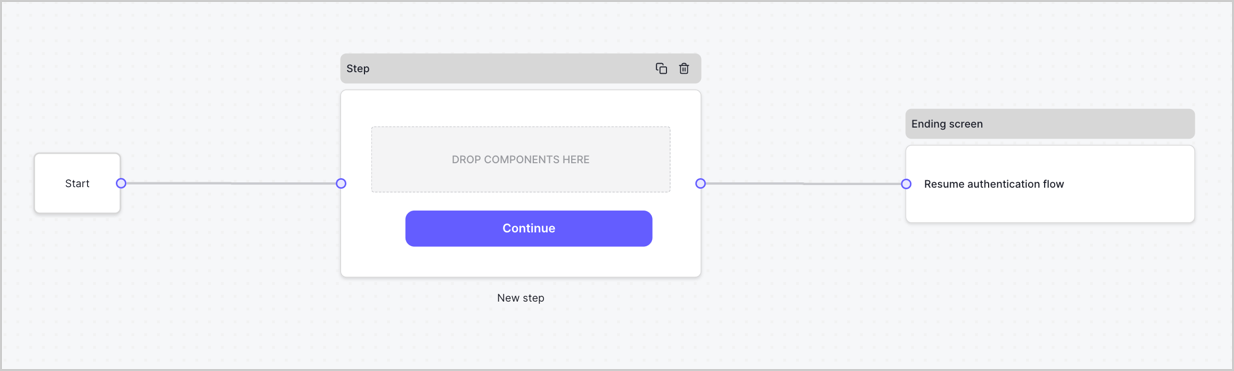
By default, a new form contains a Start node, a Step node, and an Ending screen node.
<Frame>
  <img src="https://mintcdn.com/docs-staging-fix-docs-5547-passwordless-db-update/lfJrIYzj4gauF-h6/docs/images/cdy7uua7fh8z/2TZ9jSjgEcARFpULI6hz4R/a4319a1bd482f2ee5cc23100fdb2f42c/New-form-Forms-for-action-use-case.png?fit=max&auto=format&n=lfJrIYzj4gauF-h6&q=85&s=fd965236b142f614792822d2e9db8f4e" alt="Dashboard > Forms > Use Cases > Form" data-og-width="1234" width="1234" data-og-height="371" height="371" data-path="docs/images/cdy7uua7fh8z/2TZ9jSjgEcARFpULI6hz4R/a4319a1bd482f2ee5cc23100fdb2f42c/New-form-Forms-for-action-use-case.png" data-optimize="true" data-opv="3" srcset="https://mintcdn.com/docs-staging-fix-docs-5547-passwordless-db-update/lfJrIYzj4gauF-h6/docs/images/cdy7uua7fh8z/2TZ9jSjgEcARFpULI6hz4R/a4319a1bd482f2ee5cc23100fdb2f42c/New-form-Forms-for-action-use-case.png?w=280&fit=max&auto=format&n=lfJrIYzj4gauF-h6&q=85&s=4d9f97aaa746617b216ea4ff7c9faa67 280w, https://mintcdn.com/docs-staging-fix-docs-5547-passwordless-db-update/lfJrIYzj4gauF-h6/docs/images/cdy7uua7fh8z/2TZ9jSjgEcARFpULI6hz4R/a4319a1bd482f2ee5cc23100fdb2f42c/New-form-Forms-for-action-use-case.png?w=560&fit=max&auto=format&n=lfJrIYzj4gauF-h6&q=85&s=0715c0bb721f3a9357da128ed8b3f324 560w, https://mintcdn.com/docs-staging-fix-docs-5547-passwordless-db-update/lfJrIYzj4gauF-h6/docs/images/cdy7uua7fh8z/2TZ9jSjgEcARFpULI6hz4R/a4319a1bd482f2ee5cc23100fdb2f42c/New-form-Forms-for-action-use-case.png?w=840&fit=max&auto=format&n=lfJrIYzj4gauF-h6&q=85&s=6e9b3873eb64db274c2bce0cfa85d501 840w, https://mintcdn.com/docs-staging-fix-docs-5547-passwordless-db-update/lfJrIYzj4gauF-h6/docs/images/cdy7uua7fh8z/2TZ9jSjgEcARFpULI6hz4R/a4319a1bd482f2ee5cc23100fdb2f42c/New-form-Forms-for-action-use-case.png?w=1100&fit=max&auto=format&n=lfJrIYzj4gauF-h6&q=85&s=e00093045a9c08720b6df4af7f280baf 1100w, https://mintcdn.com/docs-staging-fix-docs-5547-passwordless-db-update/lfJrIYzj4gauF-h6/docs/images/cdy7uua7fh8z/2TZ9jSjgEcARFpULI6hz4R/a4319a1bd482f2ee5cc23100fdb2f42c/New-form-Forms-for-action-use-case.png?w=1650&fit=max&auto=format&n=lfJrIYzj4gauF-h6&q=85&s=918a2a3441e86ae7100d85fbd30e2263 1650w, https://mintcdn.com/docs-staging-fix-docs-5547-passwordless-db-update/lfJrIYzj4gauF-h6/docs/images/cdy7uua7fh8z/2TZ9jSjgEcARFpULI6hz4R/a4319a1bd482f2ee5cc23100fdb2f42c/New-form-Forms-for-action-use-case.png?w=2500&fit=max&auto=format&n=lfJrIYzj4gauF-h6&q=85&s=f0b89bcd120186f2b211ce97f2f06d62 2500w" />
</Frame>

### Configure the Step node

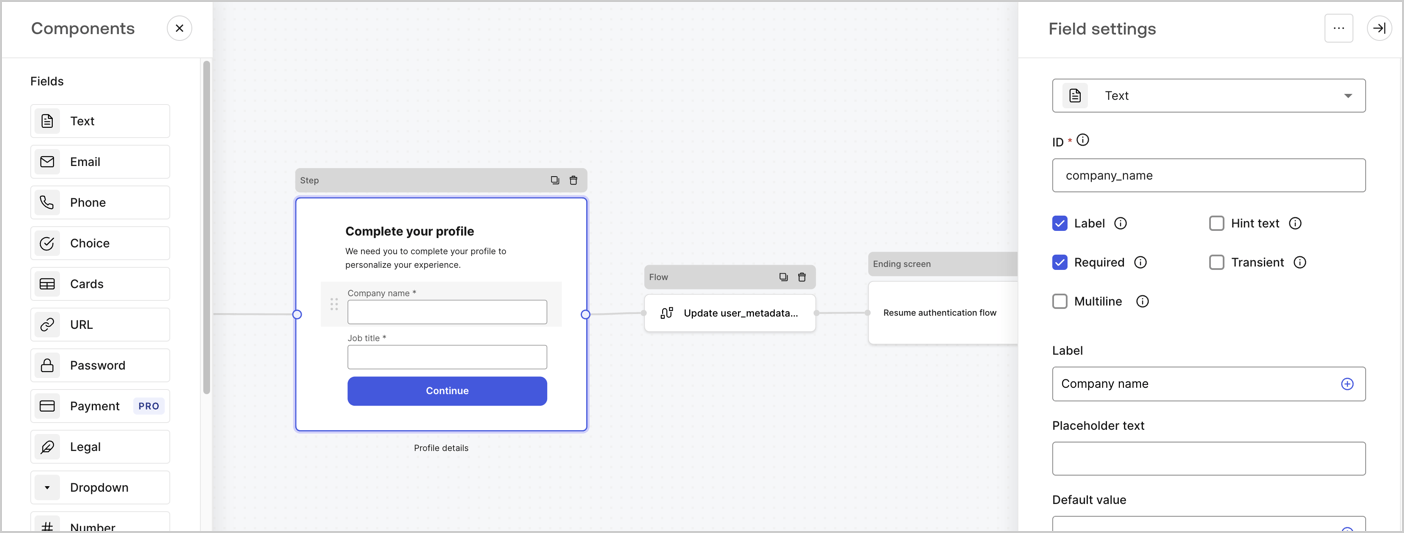
The Step node is the graphical interface visible to users. Add [Fields](/docs/customize/forms/nodes-and-components) to the Step node to collect the user's company name and job title values by following these steps:

1. Drag a **Rich text** field from the **Components menu** into the **Step** node.

   * **Rich text**: Enter a custom message.

     * **Example**: `Complete your profile! We need you to complete your profile to personalize your experience.`
   * Select **Save**.
2. Drag a **Text** field into the **Step** node.

   * **ID**: Enter `company_name`.
   * **Label**: Enable the checkbox.
   * **Label**: Enter `Company name`.
   * **Required**: Enable the checkbox.
   * Select **Save**.
3. Drag a **Text** field into the **Step** node.

   1. **ID**: Enter `job_title`.
   2. **Label**: Enter `Job title`.
   3. **Label**: Enable the checkbox.
   4. **Required**: Enable the checkbox.
   5. Select **Save**.
4. Select **Publish** to save.
<Frame>
  <img src="https://mintcdn.com/docs-staging-fix-docs-5547-passwordless-db-update/eg0faRbUCDfqaGrr/docs/images/cdy7uua7fh8z/6H1lRzwKyYioQyQJ9MtIoM/aa248e92fc028a68a5b92ff361a11644/progressive-profile-step.png?fit=max&auto=format&n=eg0faRbUCDfqaGrr&q=85&s=61427cb27b5ec62d2460eaa11bdfd19c" alt="Dashboard > Actions > Forms > Form > Step node" data-og-width="1404" width="1404" data-og-height="533" height="533" data-path="docs/images/cdy7uua7fh8z/6H1lRzwKyYioQyQJ9MtIoM/aa248e92fc028a68a5b92ff361a11644/progressive-profile-step.png" data-optimize="true" data-opv="3" srcset="https://mintcdn.com/docs-staging-fix-docs-5547-passwordless-db-update/eg0faRbUCDfqaGrr/docs/images/cdy7uua7fh8z/6H1lRzwKyYioQyQJ9MtIoM/aa248e92fc028a68a5b92ff361a11644/progressive-profile-step.png?w=280&fit=max&auto=format&n=eg0faRbUCDfqaGrr&q=85&s=3d0338a7dd176a4280cf87bf9f9504a8 280w, https://mintcdn.com/docs-staging-fix-docs-5547-passwordless-db-update/eg0faRbUCDfqaGrr/docs/images/cdy7uua7fh8z/6H1lRzwKyYioQyQJ9MtIoM/aa248e92fc028a68a5b92ff361a11644/progressive-profile-step.png?w=560&fit=max&auto=format&n=eg0faRbUCDfqaGrr&q=85&s=7e3aabd25afc9bfe35af40b2ef15863d 560w, https://mintcdn.com/docs-staging-fix-docs-5547-passwordless-db-update/eg0faRbUCDfqaGrr/docs/images/cdy7uua7fh8z/6H1lRzwKyYioQyQJ9MtIoM/aa248e92fc028a68a5b92ff361a11644/progressive-profile-step.png?w=840&fit=max&auto=format&n=eg0faRbUCDfqaGrr&q=85&s=c2390846499704019af07ec1e9ab2a9f 840w, https://mintcdn.com/docs-staging-fix-docs-5547-passwordless-db-update/eg0faRbUCDfqaGrr/docs/images/cdy7uua7fh8z/6H1lRzwKyYioQyQJ9MtIoM/aa248e92fc028a68a5b92ff361a11644/progressive-profile-step.png?w=1100&fit=max&auto=format&n=eg0faRbUCDfqaGrr&q=85&s=8c8c1861348e51333ec406c5d849c66f 1100w, https://mintcdn.com/docs-staging-fix-docs-5547-passwordless-db-update/eg0faRbUCDfqaGrr/docs/images/cdy7uua7fh8z/6H1lRzwKyYioQyQJ9MtIoM/aa248e92fc028a68a5b92ff361a11644/progressive-profile-step.png?w=1650&fit=max&auto=format&n=eg0faRbUCDfqaGrr&q=85&s=228219a895d982face5f06f3d319fd84 1650w, https://mintcdn.com/docs-staging-fix-docs-5547-passwordless-db-update/eg0faRbUCDfqaGrr/docs/images/cdy7uua7fh8z/6H1lRzwKyYioQyQJ9MtIoM/aa248e92fc028a68a5b92ff361a11644/progressive-profile-step.png?w=2500&fit=max&auto=format&n=eg0faRbUCDfqaGrr&q=85&s=eb136a9a4967ef419540f560801d7f77 2500w" />
</Frame>

### Configure the flow node

Add a **Flow** node after the **Step** node to update the `user_metadata` and resume the authentication flow by following these steps:

1. Select **Flow** from the bottom of the Form editor.
2. Remove the existing link between the **Step** and **Ending Screen** nodes.
3. Select the new **Flow** > **Click to add a flow** > **Create a new flow.**

   * Enter `Update user_metadata` in the **Name** field.
   * Select **Create**.
   * Select **Save**.
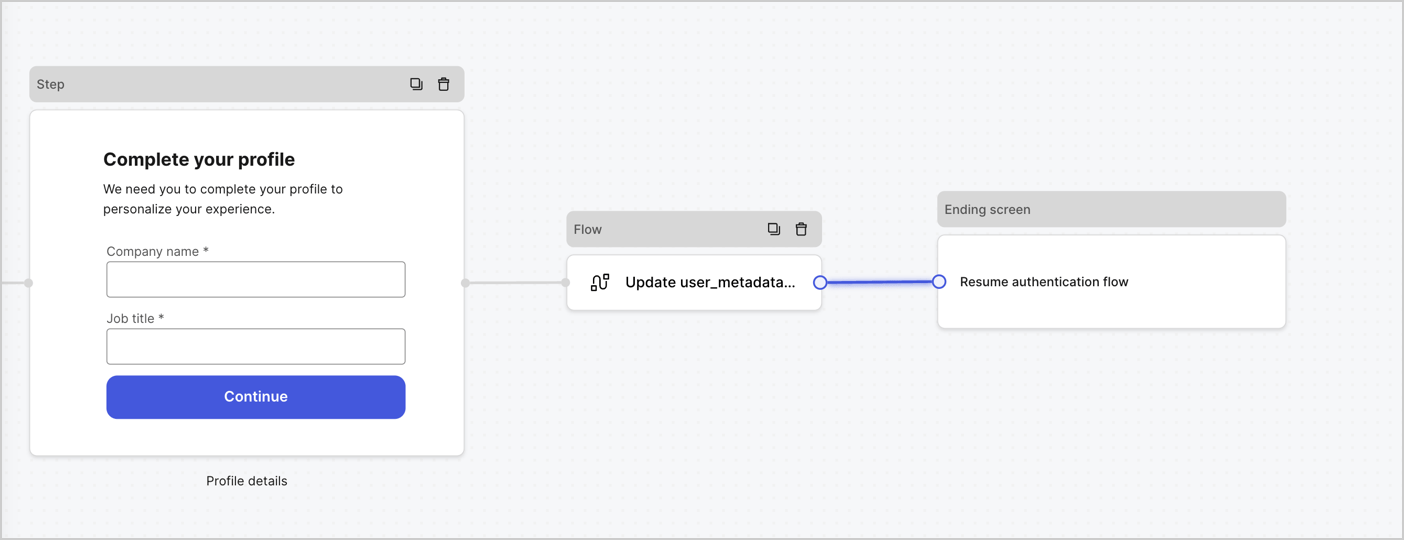
4. Link the **Flow** node to the **Step** and **Ending Screen** nodes as pictured below.
5. Select **Publish** to save.
<Frame>
  <img src="https://mintcdn.com/docs-staging-fix-docs-5547-passwordless-db-update/5HQgVl1j75M521J2/docs/images/cdy7uua7fh8z/5C91DaWn4LGtJT9BF87ssu/095171d0c452a287c44bfde12fd6d13f/link-nodes.png?fit=max&auto=format&n=5HQgVl1j75M521J2&q=85&s=a7e25770343915d1ce53b6b5439b1fce" alt="Dashboard > Actions > Forms > Form" data-og-width="1404" width="1404" data-og-height="540" height="540" data-path="docs/images/cdy7uua7fh8z/5C91DaWn4LGtJT9BF87ssu/095171d0c452a287c44bfde12fd6d13f/link-nodes.png" data-optimize="true" data-opv="3" srcset="https://mintcdn.com/docs-staging-fix-docs-5547-passwordless-db-update/5HQgVl1j75M521J2/docs/images/cdy7uua7fh8z/5C91DaWn4LGtJT9BF87ssu/095171d0c452a287c44bfde12fd6d13f/link-nodes.png?w=280&fit=max&auto=format&n=5HQgVl1j75M521J2&q=85&s=ac99a846e4a0a45a2542efc65215763c 280w, https://mintcdn.com/docs-staging-fix-docs-5547-passwordless-db-update/5HQgVl1j75M521J2/docs/images/cdy7uua7fh8z/5C91DaWn4LGtJT9BF87ssu/095171d0c452a287c44bfde12fd6d13f/link-nodes.png?w=560&fit=max&auto=format&n=5HQgVl1j75M521J2&q=85&s=3837c4bb8f467a6c5aa2e78dcb732f49 560w, https://mintcdn.com/docs-staging-fix-docs-5547-passwordless-db-update/5HQgVl1j75M521J2/docs/images/cdy7uua7fh8z/5C91DaWn4LGtJT9BF87ssu/095171d0c452a287c44bfde12fd6d13f/link-nodes.png?w=840&fit=max&auto=format&n=5HQgVl1j75M521J2&q=85&s=1655118c63125d82489961ada8f0eed1 840w, https://mintcdn.com/docs-staging-fix-docs-5547-passwordless-db-update/5HQgVl1j75M521J2/docs/images/cdy7uua7fh8z/5C91DaWn4LGtJT9BF87ssu/095171d0c452a287c44bfde12fd6d13f/link-nodes.png?w=1100&fit=max&auto=format&n=5HQgVl1j75M521J2&q=85&s=db3cd3a9f5796e43c5739ba920716853 1100w, https://mintcdn.com/docs-staging-fix-docs-5547-passwordless-db-update/5HQgVl1j75M521J2/docs/images/cdy7uua7fh8z/5C91DaWn4LGtJT9BF87ssu/095171d0c452a287c44bfde12fd6d13f/link-nodes.png?w=1650&fit=max&auto=format&n=5HQgVl1j75M521J2&q=85&s=dd54ef897eac089b854f4765b626f849 1650w, https://mintcdn.com/docs-staging-fix-docs-5547-passwordless-db-update/5HQgVl1j75M521J2/docs/images/cdy7uua7fh8z/5C91DaWn4LGtJT9BF87ssu/095171d0c452a287c44bfde12fd6d13f/link-nodes.png?w=2500&fit=max&auto=format&n=5HQgVl1j75M521J2&q=85&s=6acce27dc6a75901bdef308e267b360c 2500w" />
</Frame>

Add an Auth0 Update user action to the flow by following these steps:

1. Select the **Update user\_metadata** flow, then select the **Edit Flow** to open the Flow editor in a new tab.
2. Below the **Start** action, select the **+** icon to add an **Update user** action. Complete the fields below, then select **Save** to continue.

   * **Connection**: Select from the dropdown the Vault connection to your M2M application.

   * **User ID**: Enter `{{context.user.user_id}}`.

   * **Body**: Copy and paste the following code to update the user\_metadata with `job_title` and `company_name` properties.

     ```json lines theme={null}
     {
        "user_metadata": {
           "job_title": "{{fields.job_title}}",
           "company_name": "{{fields.company_name}}"
        }
     }
     ```

   * Select **Save**.
3. Select **Publish** to save.

<Frame>
  <img src="https://mintcdn.com/docs-staging-fix-docs-5547-passwordless-db-update/zLhJGV1Wf8QcCUdl/docs/images/cdy7uua7fh8z/65Jx4W5oIZJyyvA8z4HqIx/0661b1a8ca6361c54fc4fef07ba59f0b/update-user.png?fit=max&auto=format&n=zLhJGV1Wf8QcCUdl&q=85&s=3f695d28a2e135c563d5d96825c54557" alt="Dashboard > Actions > Forms > Flows" data-og-width="1404" width="1404" data-og-height="244" height="244" data-path="docs/images/cdy7uua7fh8z/65Jx4W5oIZJyyvA8z4HqIx/0661b1a8ca6361c54fc4fef07ba59f0b/update-user.png" data-optimize="true" data-opv="3" srcset="https://mintcdn.com/docs-staging-fix-docs-5547-passwordless-db-update/zLhJGV1Wf8QcCUdl/docs/images/cdy7uua7fh8z/65Jx4W5oIZJyyvA8z4HqIx/0661b1a8ca6361c54fc4fef07ba59f0b/update-user.png?w=280&fit=max&auto=format&n=zLhJGV1Wf8QcCUdl&q=85&s=af06a64bde282c2650dd955c7d154275 280w, https://mintcdn.com/docs-staging-fix-docs-5547-passwordless-db-update/zLhJGV1Wf8QcCUdl/docs/images/cdy7uua7fh8z/65Jx4W5oIZJyyvA8z4HqIx/0661b1a8ca6361c54fc4fef07ba59f0b/update-user.png?w=560&fit=max&auto=format&n=zLhJGV1Wf8QcCUdl&q=85&s=184e19fe3e76e26b5996c8596af23507 560w, https://mintcdn.com/docs-staging-fix-docs-5547-passwordless-db-update/zLhJGV1Wf8QcCUdl/docs/images/cdy7uua7fh8z/65Jx4W5oIZJyyvA8z4HqIx/0661b1a8ca6361c54fc4fef07ba59f0b/update-user.png?w=840&fit=max&auto=format&n=zLhJGV1Wf8QcCUdl&q=85&s=f159642f43b578fbae1c04c56be2e6ee 840w, https://mintcdn.com/docs-staging-fix-docs-5547-passwordless-db-update/zLhJGV1Wf8QcCUdl/docs/images/cdy7uua7fh8z/65Jx4W5oIZJyyvA8z4HqIx/0661b1a8ca6361c54fc4fef07ba59f0b/update-user.png?w=1100&fit=max&auto=format&n=zLhJGV1Wf8QcCUdl&q=85&s=32b174d3e34134f0ccfdc47e6c23cb4a 1100w, https://mintcdn.com/docs-staging-fix-docs-5547-passwordless-db-update/zLhJGV1Wf8QcCUdl/docs/images/cdy7uua7fh8z/65Jx4W5oIZJyyvA8z4HqIx/0661b1a8ca6361c54fc4fef07ba59f0b/update-user.png?w=1650&fit=max&auto=format&n=zLhJGV1Wf8QcCUdl&q=85&s=39bec80337c67e902d45d6453f3718c5 1650w, https://mintcdn.com/docs-staging-fix-docs-5547-passwordless-db-update/zLhJGV1Wf8QcCUdl/docs/images/cdy7uua7fh8z/65Jx4W5oIZJyyvA8z4HqIx/0661b1a8ca6361c54fc4fef07ba59f0b/update-user.png?w=2500&fit=max&auto=format&n=zLhJGV1Wf8QcCUdl&q=85&s=87fea118dbc38229f2f9506f279371ab 2500w" />
</Frame>

### Retrieve the form render code

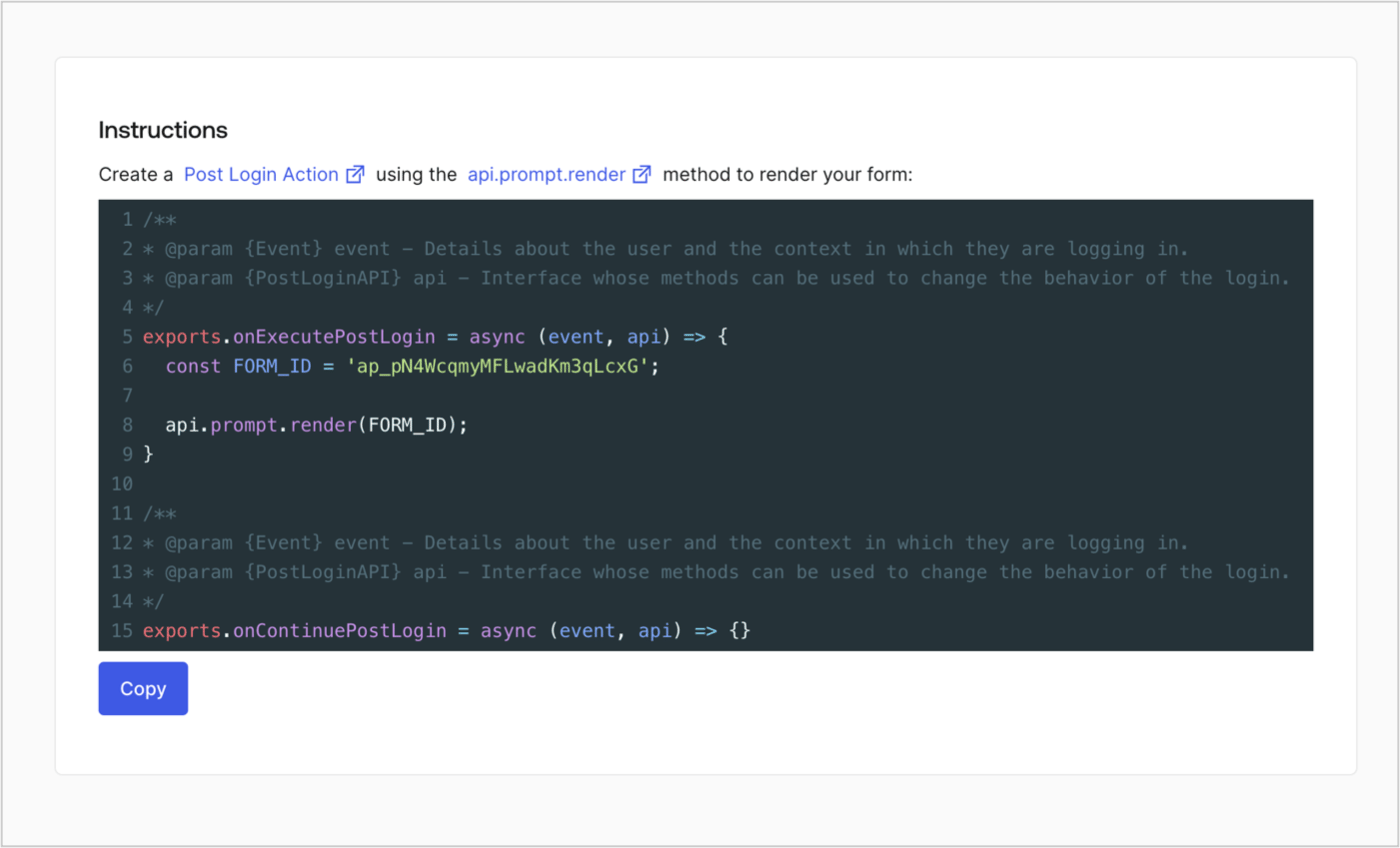
Retrieve the form render code to visually render the form with a custom Post Login Action by following these steps:

* From the Form editor, select **`<> Render`**.
* Select **Copy**.
<Frame>
  <img src="https://mintcdn.com/docs-staging-fix-docs-5547-passwordless-db-update/aBDxXkZQb969otGo/docs/images/cdy7uua7fh8z/2EIUzc539sq9lwoTKbjoJv/496a864c0fc44a782c9cadca119dbfb0/embed.png?fit=max&auto=format&n=aBDxXkZQb969otGo&q=85&s=c6223f43a26dde2392a88ccf4d968168" alt="Dashboard > Actions > Forms > Form > Embed" data-og-width="1400" width="1400" data-og-height="848" height="848" data-path="docs/images/cdy7uua7fh8z/2EIUzc539sq9lwoTKbjoJv/496a864c0fc44a782c9cadca119dbfb0/embed.png" data-optimize="true" data-opv="3" srcset="https://mintcdn.com/docs-staging-fix-docs-5547-passwordless-db-update/aBDxXkZQb969otGo/docs/images/cdy7uua7fh8z/2EIUzc539sq9lwoTKbjoJv/496a864c0fc44a782c9cadca119dbfb0/embed.png?w=280&fit=max&auto=format&n=aBDxXkZQb969otGo&q=85&s=a88d92d6ed8a08406cdfcfc26ce3f1ce 280w, https://mintcdn.com/docs-staging-fix-docs-5547-passwordless-db-update/aBDxXkZQb969otGo/docs/images/cdy7uua7fh8z/2EIUzc539sq9lwoTKbjoJv/496a864c0fc44a782c9cadca119dbfb0/embed.png?w=560&fit=max&auto=format&n=aBDxXkZQb969otGo&q=85&s=e12d36ca7082ace215de5da094e90d1f 560w, https://mintcdn.com/docs-staging-fix-docs-5547-passwordless-db-update/aBDxXkZQb969otGo/docs/images/cdy7uua7fh8z/2EIUzc539sq9lwoTKbjoJv/496a864c0fc44a782c9cadca119dbfb0/embed.png?w=840&fit=max&auto=format&n=aBDxXkZQb969otGo&q=85&s=50807671eecd510577b95f1b83547451 840w, https://mintcdn.com/docs-staging-fix-docs-5547-passwordless-db-update/aBDxXkZQb969otGo/docs/images/cdy7uua7fh8z/2EIUzc539sq9lwoTKbjoJv/496a864c0fc44a782c9cadca119dbfb0/embed.png?w=1100&fit=max&auto=format&n=aBDxXkZQb969otGo&q=85&s=d4b9ec8b3f57c605075b188bdfed8d79 1100w, https://mintcdn.com/docs-staging-fix-docs-5547-passwordless-db-update/aBDxXkZQb969otGo/docs/images/cdy7uua7fh8z/2EIUzc539sq9lwoTKbjoJv/496a864c0fc44a782c9cadca119dbfb0/embed.png?w=1650&fit=max&auto=format&n=aBDxXkZQb969otGo&q=85&s=1d833e31883114402483a4311b8a4b00 1650w, https://mintcdn.com/docs-staging-fix-docs-5547-passwordless-db-update/aBDxXkZQb969otGo/docs/images/cdy7uua7fh8z/2EIUzc539sq9lwoTKbjoJv/496a864c0fc44a782c9cadca119dbfb0/embed.png?w=2500&fit=max&auto=format&n=aBDxXkZQb969otGo&q=85&s=58385ba4bea9bf14297fe688e98ee516 2500w" />
</Frame>

## Create a Post Login Action

Create a post-login Action to render your form by following these steps:

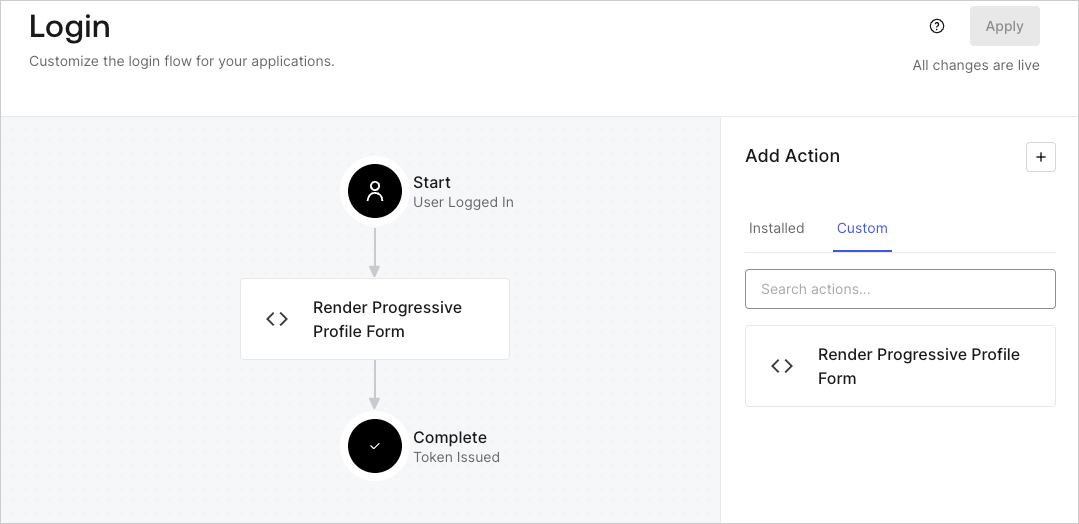
1. Navigate to **Auth0 Dashboard > Actions > Flows > Login.**
2. Select the **+** icon and select **Build from scratch**:

   * **Name**: Enter `Render Progressive Profile Form`.
   * **Trigger**: Select `Login / Post Login`.
   * **Runtime**: Select the recommended version.
3. Select **Create**.

To configure the post-login Action:

1. Delete the existing code from the Code editor.
2. Paste the form embed code into the Code editor.
3. Edit the code to define the conditional logic that will render the form.

   ```javascript lines theme={null}
   /**
   * @param {Event} event - Details about the user and the context in which they are logging in.
   * @param {PostLoginAPI} api - Interface whose methods can be used to change the behavior of the login.
   */
   exports.onExecutePostLogin = async (event, api) => {
     const FORM_ID = 'REPLACE_WITH_YOUR_FORM_ID';

     if (
       event.stats.logins_count > 2 &&
       !event.user.user_metadata.company_name &&
       !event.user.user_metadata.job_title
     ) {
       api.prompt.render(FORM_ID);
     }
   }

   exports.onContinuePostLogin = async (event, api) => { }
   ```

   <Callout icon="file-lines" color="#0EA5E9" iconType="regular">
     The example code above will render the form when a user has a login count > 2 and is missing the user metadata company\_name and job\_title properties.
   </Callout>
4. Select **Deploy.**
5. Drag and Drop the **Render Progressive Profile Form** Action to the **Login** flow.
   <Frame>
     <img src="https://mintcdn.com/docs-staging-fix-docs-5547-passwordless-db-update/DSLfGTuHA1xNDG-u/docs/images/cdy7uua7fh8z/1QjjZdpTqTxx012UDN4xk9/99fba5ef4068a5688f1762eea7f42976/renderprogessiveprofile.png?fit=max&auto=format&n=DSLfGTuHA1xNDG-u&q=85&s=460b0870be6202119b15bf27a10b15f7" alt="Dashboard > Forms > Use Cases Progressive Profile Login Action" data-og-width="1079" width="1079" data-og-height="524" height="524" data-path="docs/images/cdy7uua7fh8z/1QjjZdpTqTxx012UDN4xk9/99fba5ef4068a5688f1762eea7f42976/renderprogessiveprofile.png" data-optimize="true" data-opv="3" srcset="https://mintcdn.com/docs-staging-fix-docs-5547-passwordless-db-update/DSLfGTuHA1xNDG-u/docs/images/cdy7uua7fh8z/1QjjZdpTqTxx012UDN4xk9/99fba5ef4068a5688f1762eea7f42976/renderprogessiveprofile.png?w=280&fit=max&auto=format&n=DSLfGTuHA1xNDG-u&q=85&s=94a400262c863856be6eede63db30f3c 280w, https://mintcdn.com/docs-staging-fix-docs-5547-passwordless-db-update/DSLfGTuHA1xNDG-u/docs/images/cdy7uua7fh8z/1QjjZdpTqTxx012UDN4xk9/99fba5ef4068a5688f1762eea7f42976/renderprogessiveprofile.png?w=560&fit=max&auto=format&n=DSLfGTuHA1xNDG-u&q=85&s=8b9e53da41c545ba56edfec8f7ac4d70 560w, https://mintcdn.com/docs-staging-fix-docs-5547-passwordless-db-update/DSLfGTuHA1xNDG-u/docs/images/cdy7uua7fh8z/1QjjZdpTqTxx012UDN4xk9/99fba5ef4068a5688f1762eea7f42976/renderprogessiveprofile.png?w=840&fit=max&auto=format&n=DSLfGTuHA1xNDG-u&q=85&s=0ae47e43f899e2cfc8b797754af4830c 840w, https://mintcdn.com/docs-staging-fix-docs-5547-passwordless-db-update/DSLfGTuHA1xNDG-u/docs/images/cdy7uua7fh8z/1QjjZdpTqTxx012UDN4xk9/99fba5ef4068a5688f1762eea7f42976/renderprogessiveprofile.png?w=1100&fit=max&auto=format&n=DSLfGTuHA1xNDG-u&q=85&s=dde03e3ce93f3f3ff85d150f0a0ba6da 1100w, https://mintcdn.com/docs-staging-fix-docs-5547-passwordless-db-update/DSLfGTuHA1xNDG-u/docs/images/cdy7uua7fh8z/1QjjZdpTqTxx012UDN4xk9/99fba5ef4068a5688f1762eea7f42976/renderprogessiveprofile.png?w=1650&fit=max&auto=format&n=DSLfGTuHA1xNDG-u&q=85&s=c49be2c97df9bb1d05c51f871812e45d 1650w, https://mintcdn.com/docs-staging-fix-docs-5547-passwordless-db-update/DSLfGTuHA1xNDG-u/docs/images/cdy7uua7fh8z/1QjjZdpTqTxx012UDN4xk9/99fba5ef4068a5688f1762eea7f42976/renderprogessiveprofile.png?w=2500&fit=max&auto=format&n=DSLfGTuHA1xNDG-u&q=85&s=4a6caa493b8aa3df894cc1f2b2c330cd 2500w" />
   </Frame>
6. Select **Apply**.

### Test implementation

Test the implementation by following these steps:

1. Log in with an existing user whose login count is greater than 2 and their `user_metadata` attributes `company_name` and `job_title` have no values.
2. The post-login action in the Login flow will render the form and prompt for the information.
3. Select **Auth0 Dashboard > User Management > Users,** locate the user and verify that the `user_metadata` attributes `company_name` and `job_title` contain information.
