> ## Documentation Index
> Fetch the complete documentation index at: https://docs-staging-fix-docs-5547-passwordless-db-update.mintlify.site/llms.txt
> Use this file to discover all available pages before exploring further.

> Learn how to use variables in Forms for Actions.

# Variables and helper functions

Variables allow you to access data contained in Forms and Flows to create custom business logic and automations.

Some basic considerations to using variables are:

* Variables are surrounded by curly brackets `{{ variable }}`.
* If a variable doesn't exist or can't be resolved, it has the same effect as an `undefined` variable.
* You can use nullish operators to handle `null` or `undefined` variables, for example:`{{fields.foo ?? fields.bar}}`.

## Available variables

You can use different types of variables to reference and transform data you gather from customers with Forms and Flows.

| Variable            | Syntax            | Where         | Description                                                      |
| ------------------- | ----------------- | ------------- | ---------------------------------------------------------------- |
| Context             | `{{context.*}}`   | Forms / Flows | Reference context data of the current transaction                |
| Form fields         | `{{fields.*}}`    | Forms / Flows | Reference data from your form fields and hidden fields           |
| Shared variables    | `{{vars.*}}`      | Forms / Flows | Reference data stored as shared variables                        |
| Flow actions output | `{{actions.*}}`   | Flows         | Reference data from the output response of previous flow actions |
| Helper functions    | `{{functions.*}}` | Forms / Flows | Helper functions to transform data                               |

### Context variables

Forms and flows automatically inherit context variables from the current transaction. You can access the following context variables:

* The `user` object, with access to the following properties:

  * `user.user_id`
  * `user.username`
  * `user.name`
  * `user.given_name`
  * `user.family_name`
  * `user.nickname`
  * `user.email`
  * `user.email_verified`
  * `user.phone_number`
  * `user.phone_verified`
  * `user.picture`
  * `user.user_metadata`
  * `user.app_metadata`
  * `user.created_at`
  * `user.updated_at`
  * `user.last_password_reset`
  * `user.identities`
* The `organization` object, with access to the following properties:

  * `organization.id`
  * `organization.name`
  * `organization.display_name`
  * `organization.metadata`
* The `client` object, with access to the following properties:

  * `client.client_id`
  * `client.name`
* The `tenant` object, with access to the following property:

  * `tenant.name`
* The `transaction` object, with access to the following property:

  * `transaction.state`
  * `transaction.correlation_id`
* The `custom_domain` object, with access to the following property:

  * `custome_domain.domain`
  * `custome_domain.domain_metadata`

<Accordion title="Example of context object">
  ```json lines expandable theme={null}
  {
    "user": {
      "user_id": "auth0|658409...",
      "name": "ana@travel0.com",
      "nickname": "ana",
      "email": "ana@travel0.com",
      "email_verified": true,
      "picture": "https://s.gravatar.com/avatar/8eb1b522f6...",
      "user_metadata": {},
      "app_metadata": {},
      "created_at": "2023-12-21T09:46:40.487Z",
      "updated_at": "2024-05-07T10:44:26.271Z",
      "last_password_reset": "2023-12-21T09:49:08.932Z",
      "identities": [
        {
          "user_id": "6584...",
          "isSocial": false,
          "provider": "auth0",
          "connection": "Username-Password-Authentication"
        }
      ]
    },
    "client": {
      "client_id": "xpeg5...",
      "name": "My App"
    },
    "tenant": {
      "name": "tenant-testing"
    },
    "transaction": {
      "state": "hKFo2SBId2M0..."
    },
    "custom_domain": {
      "domain": "example.com",
      "domain_metadata": {
        "key": "value"
      }
    }
  }
  ```
</Accordion>

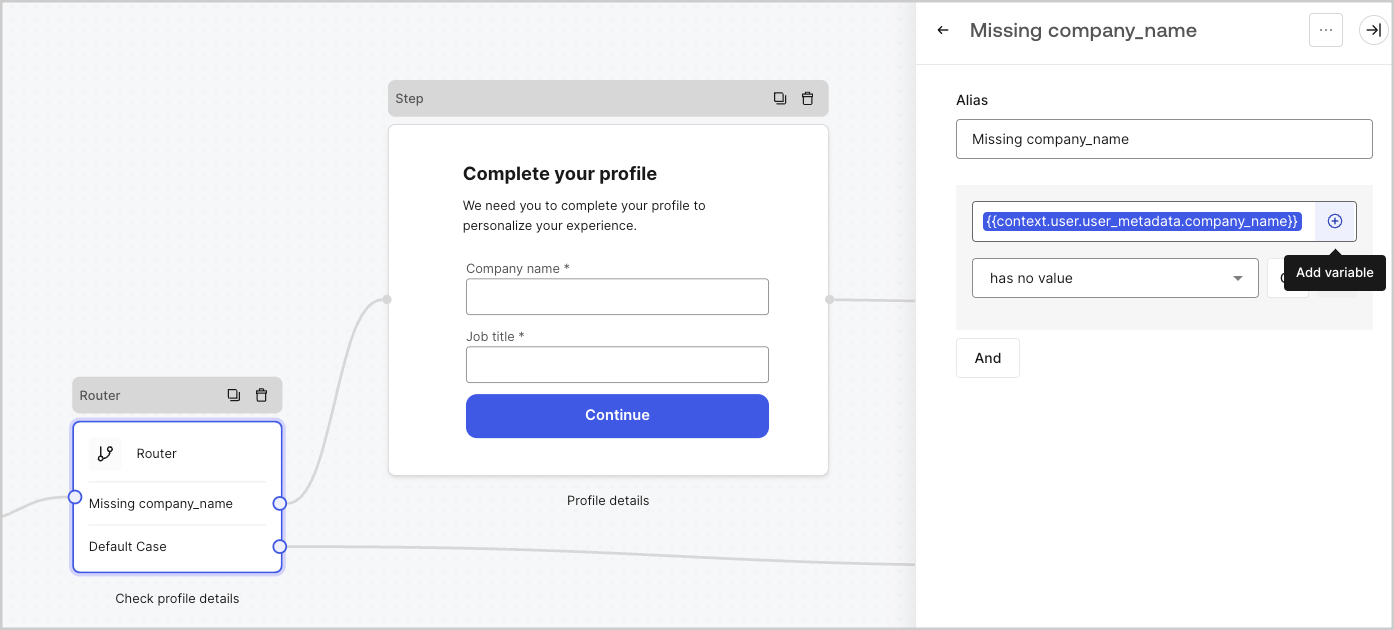
For example:  `{{context.user.user_id}}` references the `user_id` of the `user` object.

<Frame>
  <img src="https://mintcdn.com/docs-staging-fix-docs-5547-passwordless-db-update/lfJrIYzj4gauF-h6/docs/images/cdy7uua7fh8z/3B8DRhXO2wGqeqSFb8KbQv/0a61cdbbb7f1d290950a2ddb9857aac3/Contex-variable.png?fit=max&auto=format&n=lfJrIYzj4gauF-h6&q=85&s=7f2edf6dfd1491a0392338edc4d8aacc" alt="Dashboard > Forms > Flows" data-og-width="1141" width="1141" data-og-height="219" height="219" data-path="docs/images/cdy7uua7fh8z/3B8DRhXO2wGqeqSFb8KbQv/0a61cdbbb7f1d290950a2ddb9857aac3/Contex-variable.png" data-optimize="true" data-opv="3" srcset="https://mintcdn.com/docs-staging-fix-docs-5547-passwordless-db-update/lfJrIYzj4gauF-h6/docs/images/cdy7uua7fh8z/3B8DRhXO2wGqeqSFb8KbQv/0a61cdbbb7f1d290950a2ddb9857aac3/Contex-variable.png?w=280&fit=max&auto=format&n=lfJrIYzj4gauF-h6&q=85&s=af7a3a1d85d30ede33a2b43fe8e20825 280w, https://mintcdn.com/docs-staging-fix-docs-5547-passwordless-db-update/lfJrIYzj4gauF-h6/docs/images/cdy7uua7fh8z/3B8DRhXO2wGqeqSFb8KbQv/0a61cdbbb7f1d290950a2ddb9857aac3/Contex-variable.png?w=560&fit=max&auto=format&n=lfJrIYzj4gauF-h6&q=85&s=3cd604e83ff5912d5d2c65f453a85287 560w, https://mintcdn.com/docs-staging-fix-docs-5547-passwordless-db-update/lfJrIYzj4gauF-h6/docs/images/cdy7uua7fh8z/3B8DRhXO2wGqeqSFb8KbQv/0a61cdbbb7f1d290950a2ddb9857aac3/Contex-variable.png?w=840&fit=max&auto=format&n=lfJrIYzj4gauF-h6&q=85&s=ebb1b667836db5e609806a6801b82250 840w, https://mintcdn.com/docs-staging-fix-docs-5547-passwordless-db-update/lfJrIYzj4gauF-h6/docs/images/cdy7uua7fh8z/3B8DRhXO2wGqeqSFb8KbQv/0a61cdbbb7f1d290950a2ddb9857aac3/Contex-variable.png?w=1100&fit=max&auto=format&n=lfJrIYzj4gauF-h6&q=85&s=930c679a9d2d7b20c2ed4588b648bca6 1100w, https://mintcdn.com/docs-staging-fix-docs-5547-passwordless-db-update/lfJrIYzj4gauF-h6/docs/images/cdy7uua7fh8z/3B8DRhXO2wGqeqSFb8KbQv/0a61cdbbb7f1d290950a2ddb9857aac3/Contex-variable.png?w=1650&fit=max&auto=format&n=lfJrIYzj4gauF-h6&q=85&s=3ac7b69594b5ba898081078f0da9066e 1650w, https://mintcdn.com/docs-staging-fix-docs-5547-passwordless-db-update/lfJrIYzj4gauF-h6/docs/images/cdy7uua7fh8z/3B8DRhXO2wGqeqSFb8KbQv/0a61cdbbb7f1d290950a2ddb9857aac3/Contex-variable.png?w=2500&fit=max&auto=format&n=lfJrIYzj4gauF-h6&q=85&s=8cbb25747d69b316044b8d59fd2d9a63 2500w" />
</Frame>

### Form fields variables

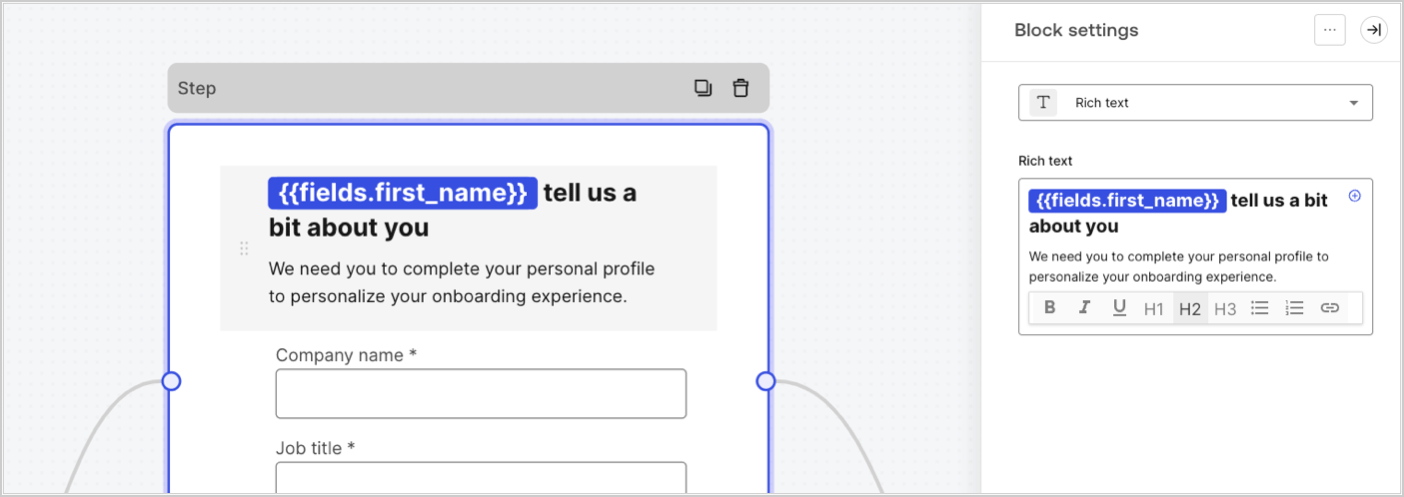
Field variables contain data collected from the user from input fields in the form and data from hidden fields. The data of each field varies depending on the field type. For example: `{{fields.first_name}}` references the input value of a field with the ID `first_name`.
<Frame>
  <img src="https://mintcdn.com/docs-staging-fix-docs-5547-passwordless-db-update/XafwvUJnrr4HBbtB/docs/images/cdy7uua7fh8z/4D42A6ww4XvFxweoxh04Rd/016c2ed9d25bc2267ed3ed31bf8b2bf6/form-fields-variable.png?fit=max&auto=format&n=XafwvUJnrr4HBbtB&q=85&s=2b64a38ceacc4449e31d2f2c6812b80e" alt="Dashboard > Actions > Forms > Form" data-og-width="1404" width="1404" data-og-height="497" height="497" data-path="docs/images/cdy7uua7fh8z/4D42A6ww4XvFxweoxh04Rd/016c2ed9d25bc2267ed3ed31bf8b2bf6/form-fields-variable.png" data-optimize="true" data-opv="3" srcset="https://mintcdn.com/docs-staging-fix-docs-5547-passwordless-db-update/XafwvUJnrr4HBbtB/docs/images/cdy7uua7fh8z/4D42A6ww4XvFxweoxh04Rd/016c2ed9d25bc2267ed3ed31bf8b2bf6/form-fields-variable.png?w=280&fit=max&auto=format&n=XafwvUJnrr4HBbtB&q=85&s=2c1e4c366527b2b4a50995dffd394daf 280w, https://mintcdn.com/docs-staging-fix-docs-5547-passwordless-db-update/XafwvUJnrr4HBbtB/docs/images/cdy7uua7fh8z/4D42A6ww4XvFxweoxh04Rd/016c2ed9d25bc2267ed3ed31bf8b2bf6/form-fields-variable.png?w=560&fit=max&auto=format&n=XafwvUJnrr4HBbtB&q=85&s=c0c77a6d48558513bb27bd8e6989000b 560w, https://mintcdn.com/docs-staging-fix-docs-5547-passwordless-db-update/XafwvUJnrr4HBbtB/docs/images/cdy7uua7fh8z/4D42A6ww4XvFxweoxh04Rd/016c2ed9d25bc2267ed3ed31bf8b2bf6/form-fields-variable.png?w=840&fit=max&auto=format&n=XafwvUJnrr4HBbtB&q=85&s=c7a389bd72f7fa84ee30d1cdf6d43ab2 840w, https://mintcdn.com/docs-staging-fix-docs-5547-passwordless-db-update/XafwvUJnrr4HBbtB/docs/images/cdy7uua7fh8z/4D42A6ww4XvFxweoxh04Rd/016c2ed9d25bc2267ed3ed31bf8b2bf6/form-fields-variable.png?w=1100&fit=max&auto=format&n=XafwvUJnrr4HBbtB&q=85&s=b4b410bacd7d6eb288a18243bf2ca879 1100w, https://mintcdn.com/docs-staging-fix-docs-5547-passwordless-db-update/XafwvUJnrr4HBbtB/docs/images/cdy7uua7fh8z/4D42A6ww4XvFxweoxh04Rd/016c2ed9d25bc2267ed3ed31bf8b2bf6/form-fields-variable.png?w=1650&fit=max&auto=format&n=XafwvUJnrr4HBbtB&q=85&s=90f9d14c61b9b6f097377b98c6430ea4 1650w, https://mintcdn.com/docs-staging-fix-docs-5547-passwordless-db-update/XafwvUJnrr4HBbtB/docs/images/cdy7uua7fh8z/4D42A6ww4XvFxweoxh04Rd/016c2ed9d25bc2267ed3ed31bf8b2bf6/form-fields-variable.png?w=2500&fit=max&auto=format&n=XafwvUJnrr4HBbtB&q=85&s=43a486db8bb1418d8496215e1edf337b 2500w" />
</Frame>

### Flow output actions variables

When a flow action is executed, it generates an output object response that can be referenced in subsequent actions. For example: `{{actions.generate_otp.code}}` references the output code of the action with ID `generate_otp`.

<Frame>
  <img src="https://mintcdn.com/docs-staging-fix-docs-5547-passwordless-db-update/eg0faRbUCDfqaGrr/docs/images/cdy7uua7fh8z/6jYtEdYqSGXm3DDv0mxQ0o/2d48012629745e07137bf6ba42f4d829/flow-output-variable.png?fit=max&auto=format&n=eg0faRbUCDfqaGrr&q=85&s=7c804d9aa6e857bd0e904b5f12891ebf" alt="Dashboard > Actions > Forms > Flows" data-og-width="1404" width="1404" data-og-height="253" height="253" data-path="docs/images/cdy7uua7fh8z/6jYtEdYqSGXm3DDv0mxQ0o/2d48012629745e07137bf6ba42f4d829/flow-output-variable.png" data-optimize="true" data-opv="3" srcset="https://mintcdn.com/docs-staging-fix-docs-5547-passwordless-db-update/eg0faRbUCDfqaGrr/docs/images/cdy7uua7fh8z/6jYtEdYqSGXm3DDv0mxQ0o/2d48012629745e07137bf6ba42f4d829/flow-output-variable.png?w=280&fit=max&auto=format&n=eg0faRbUCDfqaGrr&q=85&s=c520148fffaa0a9ed358a7d318107706 280w, https://mintcdn.com/docs-staging-fix-docs-5547-passwordless-db-update/eg0faRbUCDfqaGrr/docs/images/cdy7uua7fh8z/6jYtEdYqSGXm3DDv0mxQ0o/2d48012629745e07137bf6ba42f4d829/flow-output-variable.png?w=560&fit=max&auto=format&n=eg0faRbUCDfqaGrr&q=85&s=16b2cad5eff3955b6bd318fb51667782 560w, https://mintcdn.com/docs-staging-fix-docs-5547-passwordless-db-update/eg0faRbUCDfqaGrr/docs/images/cdy7uua7fh8z/6jYtEdYqSGXm3DDv0mxQ0o/2d48012629745e07137bf6ba42f4d829/flow-output-variable.png?w=840&fit=max&auto=format&n=eg0faRbUCDfqaGrr&q=85&s=a9cd671fd7bf172bb21a41220e7cd4c8 840w, https://mintcdn.com/docs-staging-fix-docs-5547-passwordless-db-update/eg0faRbUCDfqaGrr/docs/images/cdy7uua7fh8z/6jYtEdYqSGXm3DDv0mxQ0o/2d48012629745e07137bf6ba42f4d829/flow-output-variable.png?w=1100&fit=max&auto=format&n=eg0faRbUCDfqaGrr&q=85&s=30f147f6122df4db5d7f477d490a7fdc 1100w, https://mintcdn.com/docs-staging-fix-docs-5547-passwordless-db-update/eg0faRbUCDfqaGrr/docs/images/cdy7uua7fh8z/6jYtEdYqSGXm3DDv0mxQ0o/2d48012629745e07137bf6ba42f4d829/flow-output-variable.png?w=1650&fit=max&auto=format&n=eg0faRbUCDfqaGrr&q=85&s=510ca4dcd0803a7e85671ec74192b0ac 1650w, https://mintcdn.com/docs-staging-fix-docs-5547-passwordless-db-update/eg0faRbUCDfqaGrr/docs/images/cdy7uua7fh8z/6jYtEdYqSGXm3DDv0mxQ0o/2d48012629745e07137bf6ba42f4d829/flow-output-variable.png?w=2500&fit=max&auto=format&n=eg0faRbUCDfqaGrr&q=85&s=0009b934021f30fefeea48c587998287 2500w" />
</Frame>

### Shared variables

You can store variables to be shared with subsequent flows or even with form components in the same transaction. Shared variables are ephemeral and are associated with a specific form journey. Their values cannot be accessed outside of that journey. For example: `{{vars.external_id}}` references the value of a shared variable with ID `external_id`.

<Frame>
  <img src="https://mintcdn.com/docs-staging-fix-docs-5547-passwordless-db-update/XafwvUJnrr4HBbtB/docs/images/cdy7uua7fh8z/4571ExRTHL0KZKJKX9pNwj/abb631b8608a6356b0e5b3784cf8b02f/flow-shared-variable.png?fit=max&auto=format&n=XafwvUJnrr4HBbtB&q=85&s=e0a8b780a2020fad56ffa6db36a17931" alt="Dashboard > Actions > Forms > Flows" data-og-width="1215" width="1215" data-og-height="162" height="162" data-path="docs/images/cdy7uua7fh8z/4571ExRTHL0KZKJKX9pNwj/abb631b8608a6356b0e5b3784cf8b02f/flow-shared-variable.png" data-optimize="true" data-opv="3" srcset="https://mintcdn.com/docs-staging-fix-docs-5547-passwordless-db-update/XafwvUJnrr4HBbtB/docs/images/cdy7uua7fh8z/4571ExRTHL0KZKJKX9pNwj/abb631b8608a6356b0e5b3784cf8b02f/flow-shared-variable.png?w=280&fit=max&auto=format&n=XafwvUJnrr4HBbtB&q=85&s=a8068368457f67a7b2ad4052b67c97ec 280w, https://mintcdn.com/docs-staging-fix-docs-5547-passwordless-db-update/XafwvUJnrr4HBbtB/docs/images/cdy7uua7fh8z/4571ExRTHL0KZKJKX9pNwj/abb631b8608a6356b0e5b3784cf8b02f/flow-shared-variable.png?w=560&fit=max&auto=format&n=XafwvUJnrr4HBbtB&q=85&s=0745adbcb26f9cf6070605492cbe9087 560w, https://mintcdn.com/docs-staging-fix-docs-5547-passwordless-db-update/XafwvUJnrr4HBbtB/docs/images/cdy7uua7fh8z/4571ExRTHL0KZKJKX9pNwj/abb631b8608a6356b0e5b3784cf8b02f/flow-shared-variable.png?w=840&fit=max&auto=format&n=XafwvUJnrr4HBbtB&q=85&s=79ec763b163d1e440f5c1ef48d415c6e 840w, https://mintcdn.com/docs-staging-fix-docs-5547-passwordless-db-update/XafwvUJnrr4HBbtB/docs/images/cdy7uua7fh8z/4571ExRTHL0KZKJKX9pNwj/abb631b8608a6356b0e5b3784cf8b02f/flow-shared-variable.png?w=1100&fit=max&auto=format&n=XafwvUJnrr4HBbtB&q=85&s=fa945aa5a492b7e4db0097facd33ff42 1100w, https://mintcdn.com/docs-staging-fix-docs-5547-passwordless-db-update/XafwvUJnrr4HBbtB/docs/images/cdy7uua7fh8z/4571ExRTHL0KZKJKX9pNwj/abb631b8608a6356b0e5b3784cf8b02f/flow-shared-variable.png?w=1650&fit=max&auto=format&n=XafwvUJnrr4HBbtB&q=85&s=dc1b184419f204bdd1cc2a24dbaed26f 1650w, https://mintcdn.com/docs-staging-fix-docs-5547-passwordless-db-update/XafwvUJnrr4HBbtB/docs/images/cdy7uua7fh8z/4571ExRTHL0KZKJKX9pNwj/abb631b8608a6356b0e5b3784cf8b02f/flow-shared-variable.png?w=2500&fit=max&auto=format&n=XafwvUJnrr4HBbtB&q=85&s=5619b9babe9adbb837430a76f65744c2 2500w" />
</Frame>

<Warning>
  Shared variables:

  * are internal (server-side) and not exposed to the browser (client-side).
  * can be resolved and exposed to the browser if you referenced a shared variable in the form component.
  * might have sensitive information, so take care when you access shared variable to avoid any unnecessary or unintentional exposure.
</Warning>

### Helper functions

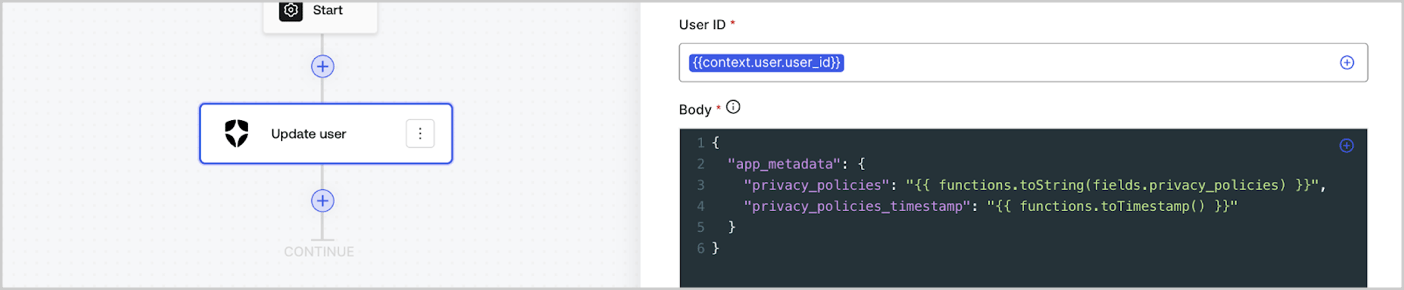
Helper functions let you transform data and perform simple operations. For example: `{{functions.toString(fields.privacy_policies)}}` transform the value of the field with ID `privacy_policies` using the `toString()` function.
<Frame>
  <img src="https://mintcdn.com/docs-staging-fix-docs-5547-passwordless-db-update/aBDxXkZQb969otGo/docs/images/cdy7uua7fh8z/1gyox33XJEtdkT43NppblT/0e878cc5ae2bde11b4207e105bbac6c5/flow-helper-functions.png?fit=max&auto=format&n=aBDxXkZQb969otGo&q=85&s=c99f8818f1abd36813a35a8bf51b9fd1" alt="Dashboard > Actions > Forms > Flows" data-og-width="1404" width="1404" data-og-height="290" height="290" data-path="docs/images/cdy7uua7fh8z/1gyox33XJEtdkT43NppblT/0e878cc5ae2bde11b4207e105bbac6c5/flow-helper-functions.png" data-optimize="true" data-opv="3" srcset="https://mintcdn.com/docs-staging-fix-docs-5547-passwordless-db-update/aBDxXkZQb969otGo/docs/images/cdy7uua7fh8z/1gyox33XJEtdkT43NppblT/0e878cc5ae2bde11b4207e105bbac6c5/flow-helper-functions.png?w=280&fit=max&auto=format&n=aBDxXkZQb969otGo&q=85&s=c78a2db226a284ef57e4e244f82138cc 280w, https://mintcdn.com/docs-staging-fix-docs-5547-passwordless-db-update/aBDxXkZQb969otGo/docs/images/cdy7uua7fh8z/1gyox33XJEtdkT43NppblT/0e878cc5ae2bde11b4207e105bbac6c5/flow-helper-functions.png?w=560&fit=max&auto=format&n=aBDxXkZQb969otGo&q=85&s=cacd73662c4e9603da8ec04335f361ec 560w, https://mintcdn.com/docs-staging-fix-docs-5547-passwordless-db-update/aBDxXkZQb969otGo/docs/images/cdy7uua7fh8z/1gyox33XJEtdkT43NppblT/0e878cc5ae2bde11b4207e105bbac6c5/flow-helper-functions.png?w=840&fit=max&auto=format&n=aBDxXkZQb969otGo&q=85&s=d15a5055913c3d8f54f0d51c7b1b1644 840w, https://mintcdn.com/docs-staging-fix-docs-5547-passwordless-db-update/aBDxXkZQb969otGo/docs/images/cdy7uua7fh8z/1gyox33XJEtdkT43NppblT/0e878cc5ae2bde11b4207e105bbac6c5/flow-helper-functions.png?w=1100&fit=max&auto=format&n=aBDxXkZQb969otGo&q=85&s=9712f93c0ebffa76824640e470a91497 1100w, https://mintcdn.com/docs-staging-fix-docs-5547-passwordless-db-update/aBDxXkZQb969otGo/docs/images/cdy7uua7fh8z/1gyox33XJEtdkT43NppblT/0e878cc5ae2bde11b4207e105bbac6c5/flow-helper-functions.png?w=1650&fit=max&auto=format&n=aBDxXkZQb969otGo&q=85&s=92a42cd98f8b3a80e206fe67ee39f834 1650w, https://mintcdn.com/docs-staging-fix-docs-5547-passwordless-db-update/aBDxXkZQb969otGo/docs/images/cdy7uua7fh8z/1gyox33XJEtdkT43NppblT/0e878cc5ae2bde11b4207e105bbac6c5/flow-helper-functions.png?w=2500&fit=max&auto=format&n=aBDxXkZQb969otGo&q=85&s=03320a801b08e226084b4987f8b1d774 2500w" />
</Frame>

The available helper functions are:

| Function                                 | Description                                                                                                                                                                                                                                                              | Example                                                                                                          |
| ---------------------------------------- | ------------------------------------------------------------------------------------------------------------------------------------------------------------------------------------------------------------------------------------------------------------------------ | ---------------------------------------------------------------------------------------------------------------- |
| `toArray(value)`                         | Converts value to an array.                                                                                                                                                                                                                                              | `{{ functions.toArray('abc') }} // ['abc']`                                                                      |
| `toBoolean(value)`                       | Converts value to a boolean value.                                                                                                                                                                                                                                       | `{{ functions.toBoolean(1) }} // true&lt;br /&gt;&lt;br /&gt;\{\{ functions.toBoolean(0) }} // false`            |
| `length(value)`                          | Returns the length of the parameter value.                                                                                                                                                                                                                               | `{{ functions.length('auth0') }} // 5`                                                                           |
| `mask(value)`                            | Masks a value to avoid be exposed in Executions.                                                                                                                                                                                                                         | `{{ functions.mask('my_awesome_secret') }} // ███`                                                               |
| `toNumber(value)`                        | Converts value to a number.                                                                                                                                                                                                                                              | `{{ functions.toNumber('123') }} // 123`                                                                         |
| `random(min, max, [boolean])`            | Returns a random number between the inclusive min and max.                                                                                                                                                                                                               | `{{ functions.random(0, 6) }} // 4 &lt;br /&gt;&lt;br /&gt;\{\{ functions.random(0, 6, true) }} // 3.8523497...` |
| `slice(value, start, end)`               | Returns a section of a value array or string between the start and end indexes.                                                                                                                                                                                          | `{{ functions.slice( 'example', 3, 5) }} // 'mp'`                                                                |
| `toString(value)`                        | Converts value to a string.                                                                                                                                                                                                                                              | `{{ functions.toString(123) }} // '123'`                                                                         |
| `substring(value, start, end)`           | Returns a section of a value between the start and end indexes. Read about the [differences of slice and substring functions](https://developer.mozilla.org/en-US/docs/Web/JavaScript/Reference/Global_Objects/String/substring#differences_between_substring_and_slice) | `{{ functions.substring( 'example’', 3, 5) }} // 'mp'`                                                           |
| `toTimestamp()`                          | Returns the current UNIX timestamp.                                                                                                                                                                                                                                      | `{{ functions.toTimestamp() }} // 1628761483`                                                                    |
| `toTimestamp(date)`                      | Returns the provided date in UNIX time.                                                                                                                                                                                                                                  | `{{ functions.toTimestamp('2021-04-30T10:02:50.876Z') }} // 1619776970`                                          |
| `toTimestamp(date)`                      | Returns the provided date in UNIX time.                                                                                                                                                                                                                                  | `{{ functions.toTimestamp('2021-04-30T10:02:50.876Z') }} // 1619776970`                                          |
| `toLowerCase(value)`                     | Returns a new string transformed to lowercase.                                                                                                                                                                                                                           | `{{ functions.toLowerCase('JohnDoe 1234') }} // johndoe 1234`                                                    |
| `toUpperCase(value)`                     | Returns a new string transformed to uppercase.                                                                                                                                                                                                                           | `{{ functions.toUpperCase('JohnDoe 1234') }} // JOHNDOE 1234`                                                    |
| `replaceAll(value, string, replacement)` | Returns a new string with all matches of a pattern replaced by a replacement.                                                                                                                                                                                            | `{{ functions.replaceAll('2021-04-30', '-', '/') }} // 2021/04/30`                                               |
| `replace(value, string, replacement)`    | Returns a new string with all matches of a pattern replaced by a replacement. If pattern is a string, only the first occurence will be replaced.                                                                                                                         | `{{ functions.replace('2021-04-30', '-', '/') }} // 2021/04-30`                                                  |
| `split(value, separator, limit?)`        | Returns an ordered list of substrings divided by the separator.                                                                                                                                                                                                          | `{{ functions.split('2021-04-30', '-') }} // ['2021', '04', '30']`                                               |
| `now()`                                  | Returns the current date in ISO 8601 format.                                                                                                                                                                                                                             | `{{ functions.now() }} // 2021-04-30T10:31:28.576Z`                                                              |
| `includes(collection, item, fromIndex?)` | Returns whether an array includes a certain value among its entries.                                                                                                                                                                                                     | `{{ functions.includes(['auth0', 'identity', 'authentication'], 'identity') }} // true`                          |
| `indexOf(collection, item, fromIndex?)`  | Returns the first index at which a given element can be found in the array, or -1 if it is not present.                                                                                                                                                                  | `{{ functions.indexOf(['auth0', 'identity', 'authentication'], 'identity') }} // 1`                              |
| `merge(base, value)`                     | Returns a merged array, object or concatenates a string depending on the base data type.                                                                                                                                                                                 | `{{ functions.merge(['auth0', 'identity'], ['authentication']) }} // ['auth0', 'identity', 'authentication']`    |
| `md5(value)`                             | Returns a MD5 hashed value.                                                                                                                                                                                                                                              | `{{ functions.md5('auth0') }} // 7bbb597...`                                                                     |
| `sha1(value)`                            | Returns a SHA1 hashed value.                                                                                                                                                                                                                                             | `{{ functions.sha1('auth0') }} // b4ec5339...`                                                                   |
| `sha256(value)`                          | Returns a SHA256 hashed value.                                                                                                                                                                                                                                           | `{{ functions.sha256('auth0') }} // d9082bdc...`                                                                 |
| `sha512(value)`                          | Returns a SHA512 hashed value.                                                                                                                                                                                                                                           | `{{ functions.sha512('auth0') }} // c0d588069d...`                                                               |
| `uuid()`                                 | Returns a random v4 UUID.                                                                                                                                                                                                                                                | `{{ functions.uuid() }} // 36b8f84d-df4e-4d49-b662-bcde71a8764`                                                  |

## Variables best practices

### Use meaningful IDs

When you add a Form field or a Flow action, the ID is automatically generated.

Update the ID to a more descriptive value so you can identify the information it contains. For example, if you create a Form field that stores the user’s first name, update the ID to `first_name`.

### Be mindful when updating existing IDs

If a variable is already in use and you need to modify the ID, identify where you have referenced it and update the ID accordingly to avoid undefined or empty values.

### Check Flow executions

If you see an unexpected variable value, use the [**Executions**](/docs/customize/forms/flows/flow-execution-and-debugger) view to troubleshoot the variable.

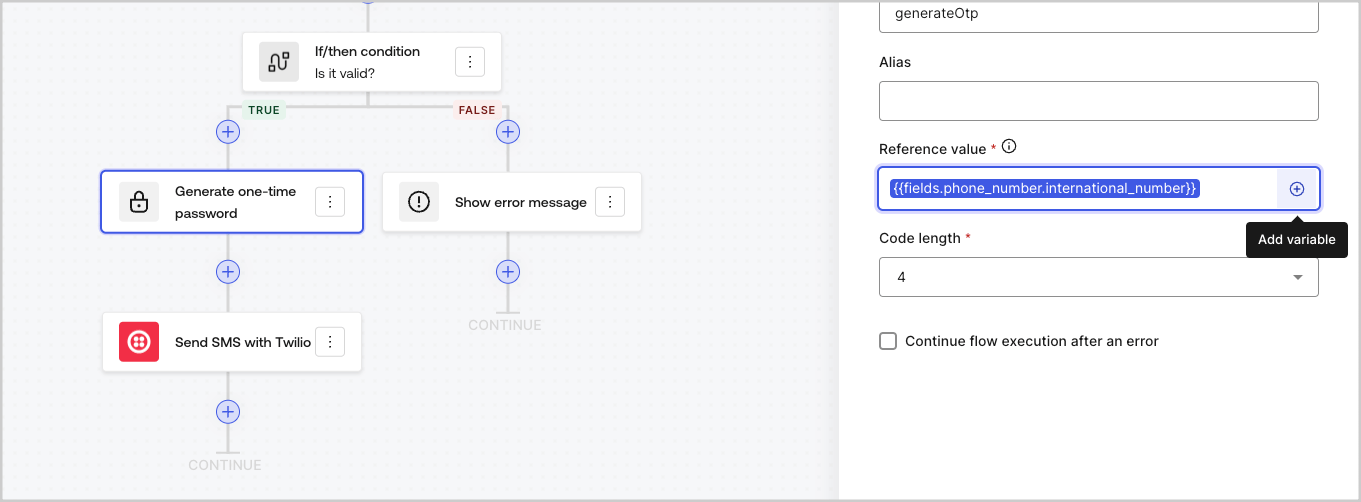
### Use the autocomplete menu

The autocomplete menu helps you locate and properly reference existing variables.
<Frame>
  <img src="https://mintcdn.com/docs-staging-fix-docs-5547-passwordless-db-update/lfJrIYzj4gauF-h6/docs/images/cdy7uua7fh8z/3SKnDuaMzSImxZtDDAoZaz/9ea800fad29ef71d1ded3c72b87660a4/Autocomplete-flows.png?fit=max&auto=format&n=lfJrIYzj4gauF-h6&q=85&s=960b16fcef59195cc1323b4a2a77af15" alt="Dashboard > Actions > Forms > Flows" data-og-width="1361" width="1361" data-og-height="502" height="502" data-path="docs/images/cdy7uua7fh8z/3SKnDuaMzSImxZtDDAoZaz/9ea800fad29ef71d1ded3c72b87660a4/Autocomplete-flows.png" data-optimize="true" data-opv="3" srcset="https://mintcdn.com/docs-staging-fix-docs-5547-passwordless-db-update/lfJrIYzj4gauF-h6/docs/images/cdy7uua7fh8z/3SKnDuaMzSImxZtDDAoZaz/9ea800fad29ef71d1ded3c72b87660a4/Autocomplete-flows.png?w=280&fit=max&auto=format&n=lfJrIYzj4gauF-h6&q=85&s=7c2616776cd5f64d3bc721ed10b658a6 280w, https://mintcdn.com/docs-staging-fix-docs-5547-passwordless-db-update/lfJrIYzj4gauF-h6/docs/images/cdy7uua7fh8z/3SKnDuaMzSImxZtDDAoZaz/9ea800fad29ef71d1ded3c72b87660a4/Autocomplete-flows.png?w=560&fit=max&auto=format&n=lfJrIYzj4gauF-h6&q=85&s=272866de442eff47a89f030c6d8b98c9 560w, https://mintcdn.com/docs-staging-fix-docs-5547-passwordless-db-update/lfJrIYzj4gauF-h6/docs/images/cdy7uua7fh8z/3SKnDuaMzSImxZtDDAoZaz/9ea800fad29ef71d1ded3c72b87660a4/Autocomplete-flows.png?w=840&fit=max&auto=format&n=lfJrIYzj4gauF-h6&q=85&s=6f235e37b2913c365d04fa28d7250b69 840w, https://mintcdn.com/docs-staging-fix-docs-5547-passwordless-db-update/lfJrIYzj4gauF-h6/docs/images/cdy7uua7fh8z/3SKnDuaMzSImxZtDDAoZaz/9ea800fad29ef71d1ded3c72b87660a4/Autocomplete-flows.png?w=1100&fit=max&auto=format&n=lfJrIYzj4gauF-h6&q=85&s=7d8ac6025c3443c12ad407f505927f1d 1100w, https://mintcdn.com/docs-staging-fix-docs-5547-passwordless-db-update/lfJrIYzj4gauF-h6/docs/images/cdy7uua7fh8z/3SKnDuaMzSImxZtDDAoZaz/9ea800fad29ef71d1ded3c72b87660a4/Autocomplete-flows.png?w=1650&fit=max&auto=format&n=lfJrIYzj4gauF-h6&q=85&s=378c3246b41cc11bbd28d308083e3e68 1650w, https://mintcdn.com/docs-staging-fix-docs-5547-passwordless-db-update/lfJrIYzj4gauF-h6/docs/images/cdy7uua7fh8z/3SKnDuaMzSImxZtDDAoZaz/9ea800fad29ef71d1ded3c72b87660a4/Autocomplete-flows.png?w=2500&fit=max&auto=format&n=lfJrIYzj4gauF-h6&q=85&s=1c00f7b83ab7e345c05381f09dfae961 2500w" />
</Frame>

<Frame>
  <img src="https://mintcdn.com/docs-staging-fix-docs-5547-passwordless-db-update/lfJrIYzj4gauF-h6/docs/images/cdy7uua7fh8z/2kjRKozVgrd2a7UJXOANaN/ee5452d7210cd2f13b0e97763f11c82a/Autocomplete-forms.png?fit=max&auto=format&n=lfJrIYzj4gauF-h6&q=85&s=94a01f22b31b0f91c5f034c99f52e627" alt="Dashboard > Actions > Forms > Form" data-og-width="1394" width="1394" data-og-height="630" height="630" data-path="docs/images/cdy7uua7fh8z/2kjRKozVgrd2a7UJXOANaN/ee5452d7210cd2f13b0e97763f11c82a/Autocomplete-forms.png" data-optimize="true" data-opv="3" srcset="https://mintcdn.com/docs-staging-fix-docs-5547-passwordless-db-update/lfJrIYzj4gauF-h6/docs/images/cdy7uua7fh8z/2kjRKozVgrd2a7UJXOANaN/ee5452d7210cd2f13b0e97763f11c82a/Autocomplete-forms.png?w=280&fit=max&auto=format&n=lfJrIYzj4gauF-h6&q=85&s=0840d5f6c1910daa548e762b05afc8bb 280w, https://mintcdn.com/docs-staging-fix-docs-5547-passwordless-db-update/lfJrIYzj4gauF-h6/docs/images/cdy7uua7fh8z/2kjRKozVgrd2a7UJXOANaN/ee5452d7210cd2f13b0e97763f11c82a/Autocomplete-forms.png?w=560&fit=max&auto=format&n=lfJrIYzj4gauF-h6&q=85&s=e9b1388fb9d264af932c7fc592d07c4a 560w, https://mintcdn.com/docs-staging-fix-docs-5547-passwordless-db-update/lfJrIYzj4gauF-h6/docs/images/cdy7uua7fh8z/2kjRKozVgrd2a7UJXOANaN/ee5452d7210cd2f13b0e97763f11c82a/Autocomplete-forms.png?w=840&fit=max&auto=format&n=lfJrIYzj4gauF-h6&q=85&s=2f5720563156cd23c96dd548e4edab46 840w, https://mintcdn.com/docs-staging-fix-docs-5547-passwordless-db-update/lfJrIYzj4gauF-h6/docs/images/cdy7uua7fh8z/2kjRKozVgrd2a7UJXOANaN/ee5452d7210cd2f13b0e97763f11c82a/Autocomplete-forms.png?w=1100&fit=max&auto=format&n=lfJrIYzj4gauF-h6&q=85&s=c9d3cb50fa6e364c21103d47f2f0b0c4 1100w, https://mintcdn.com/docs-staging-fix-docs-5547-passwordless-db-update/lfJrIYzj4gauF-h6/docs/images/cdy7uua7fh8z/2kjRKozVgrd2a7UJXOANaN/ee5452d7210cd2f13b0e97763f11c82a/Autocomplete-forms.png?w=1650&fit=max&auto=format&n=lfJrIYzj4gauF-h6&q=85&s=e864f726e1477cfe21e5ce73bfa8a502 1650w, https://mintcdn.com/docs-staging-fix-docs-5547-passwordless-db-update/lfJrIYzj4gauF-h6/docs/images/cdy7uua7fh8z/2kjRKozVgrd2a7UJXOANaN/ee5452d7210cd2f13b0e97763f11c82a/Autocomplete-forms.png?w=2500&fit=max&auto=format&n=lfJrIYzj4gauF-h6&q=85&s=4d16724f01629858f9bd9328a8464f10 2500w" />
</Frame>